Features

A full estimating bench.
In one window.

Six ribbon tabs. Thirteen panels. One price. Here's everything Groundwork Takeoff does — organized the way the app is.
Groundwork Takeoff full workspace
Home tab — Measure

Six ways to measure. Zero ways to guess.

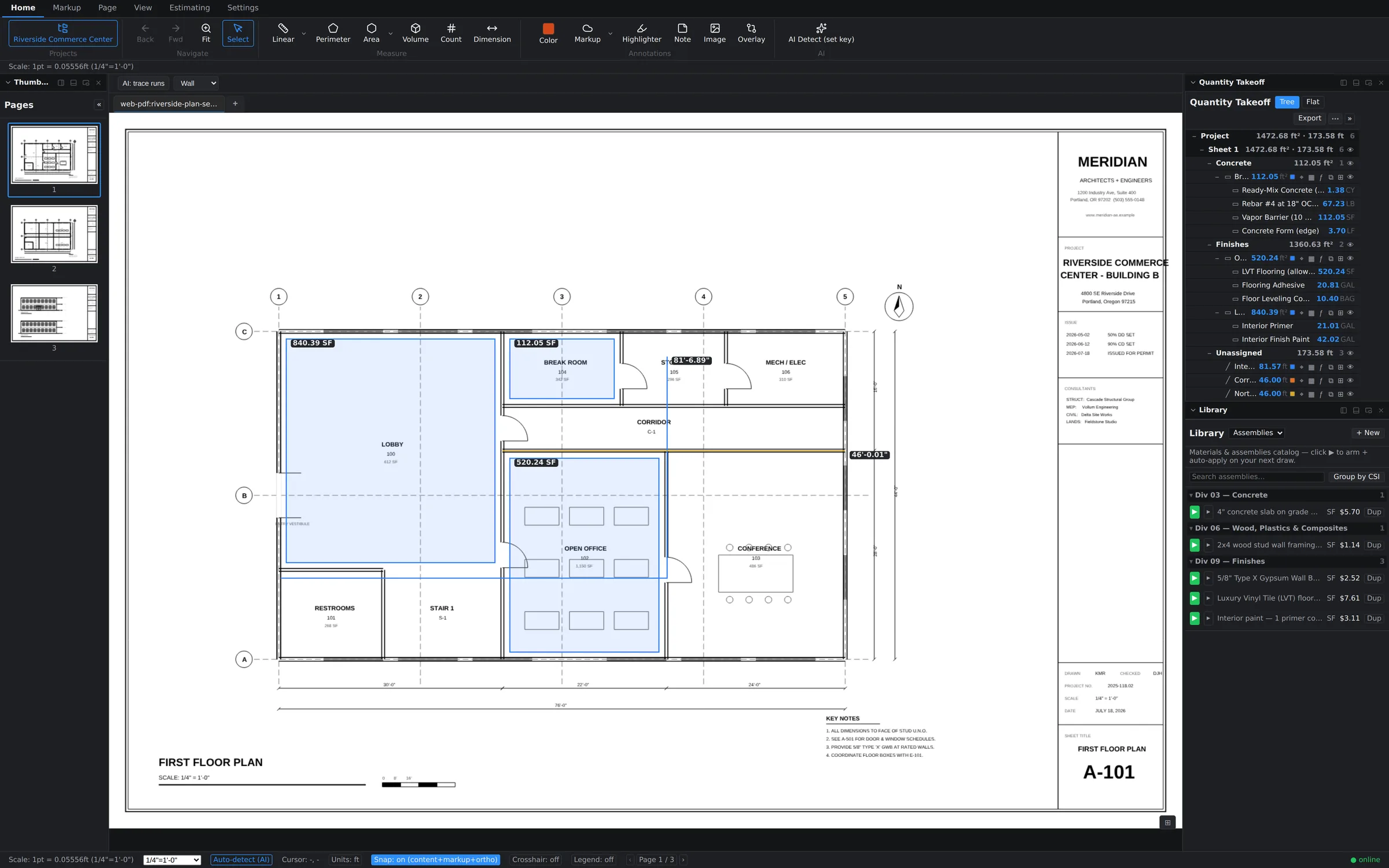
Linear for runs and edges. Perimeter for closed boundaries. Area for surfaces. Volume for depth-loaded quantities. Count for everything that repeats. Dimension for callouts your reviewers can read.

  • Smart scale — auto-detects the sheet scale; override per page or per viewport at any time
  • Dimension chains — continuous strings of dimensions that update as you adjust
  • Formula evaluator — any quantity field accepts math: (24*3)+8, unit-aware
  • Snap + crosshair — vertex-accurate placement, status-bar toggles always in reach
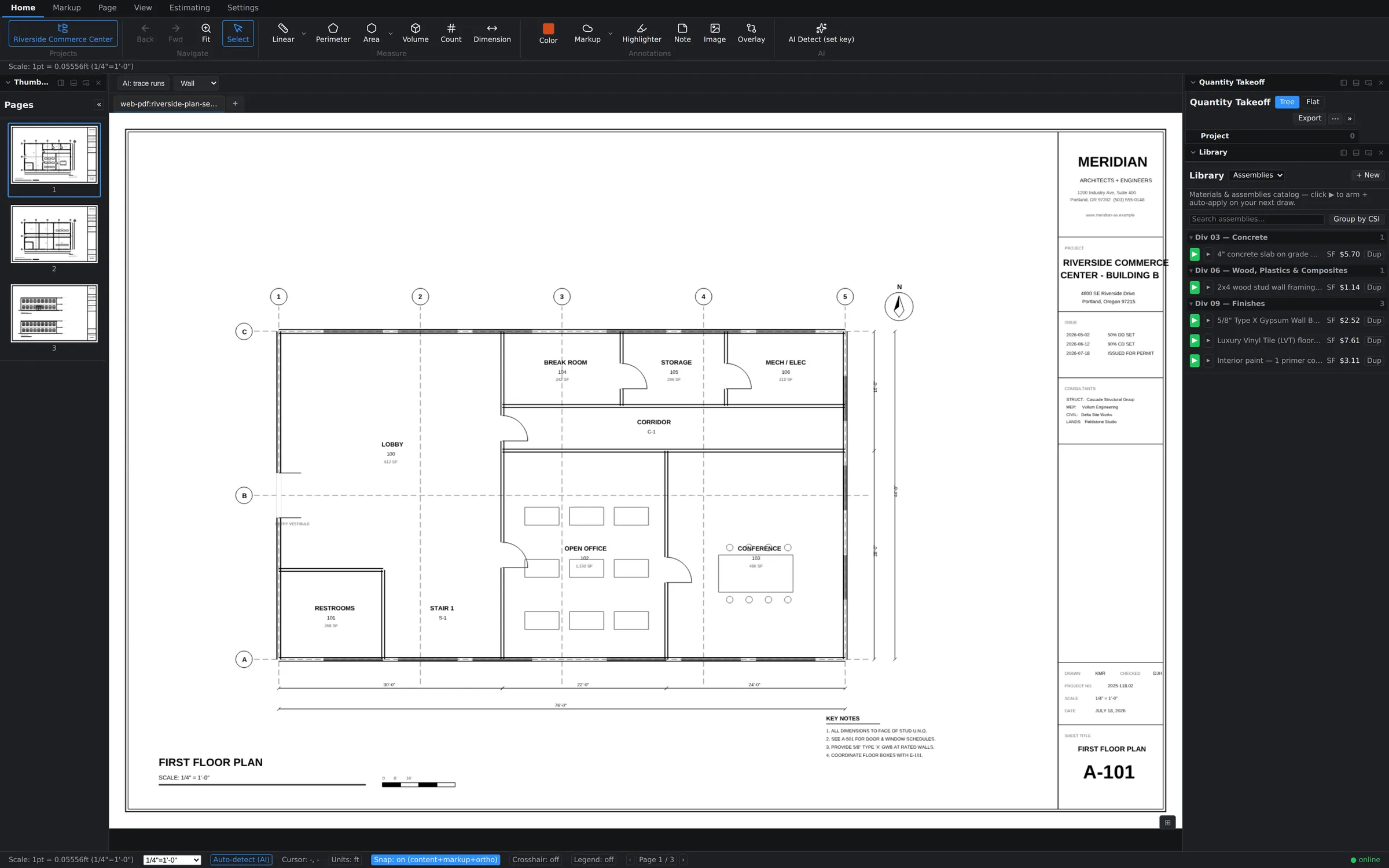
Area takeoff with tinted room polygons and square-foot quantities
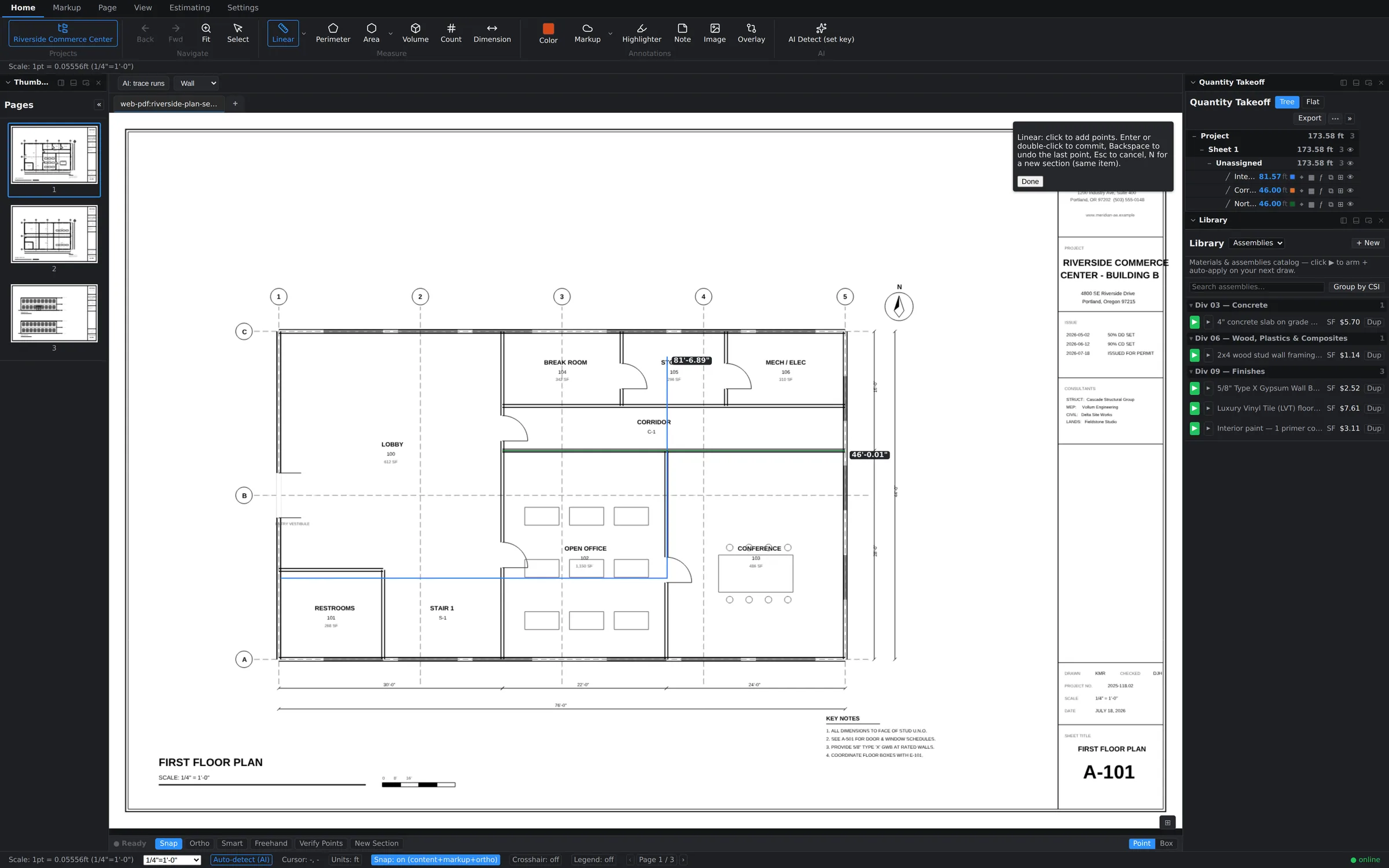
Linear takeoff with traced wall runs and length labels
Estimating tab

The estimate builds while you draw.

Most takeoff tools stop at quantities and hand you a spreadsheet problem. Groundwork carries the takeoff all the way to dollars — in the same window, on the same sheet.
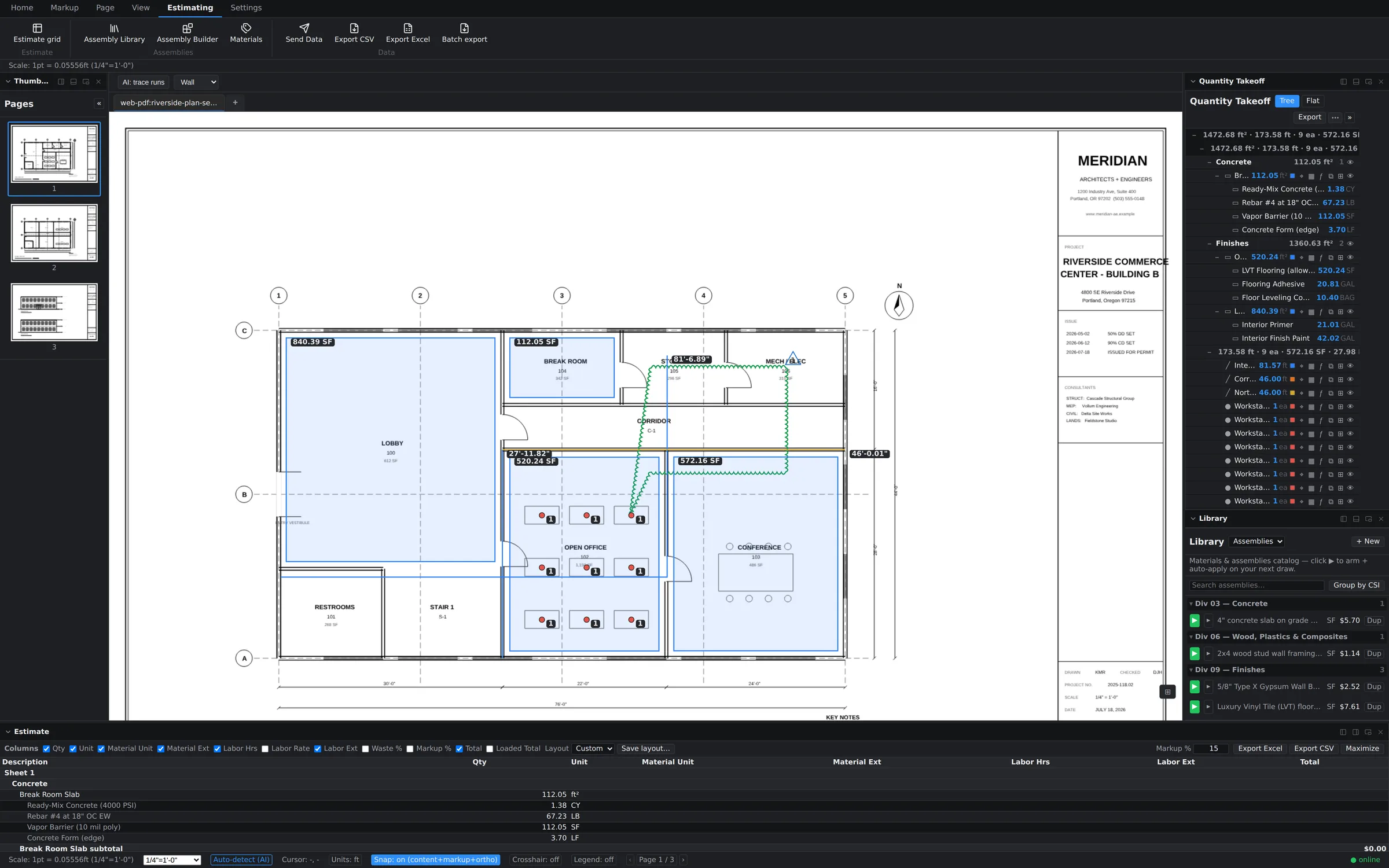
  • Assembly Library & Builder — bundle material + labor + waste into reusable assemblies
  • Arm & auto-apply — arm an assembly, draw the measurement, costs attach themselves
  • Live estimate grid — quantities, unit costs, and totals update as the takeoff changes
  • Send Data / Export — Excel, CSV, and batch export the moment a sheet has measurements
Estimate grid with priced line items from the takeoff
AI — included, not upsold

Assisted, not automated-and-hope.

Our AI proposes; you dispose. Every AI suggestion lands as a reviewable object you accept or reject — because a bid with your name on it should never contain a measurement nobody looked at.
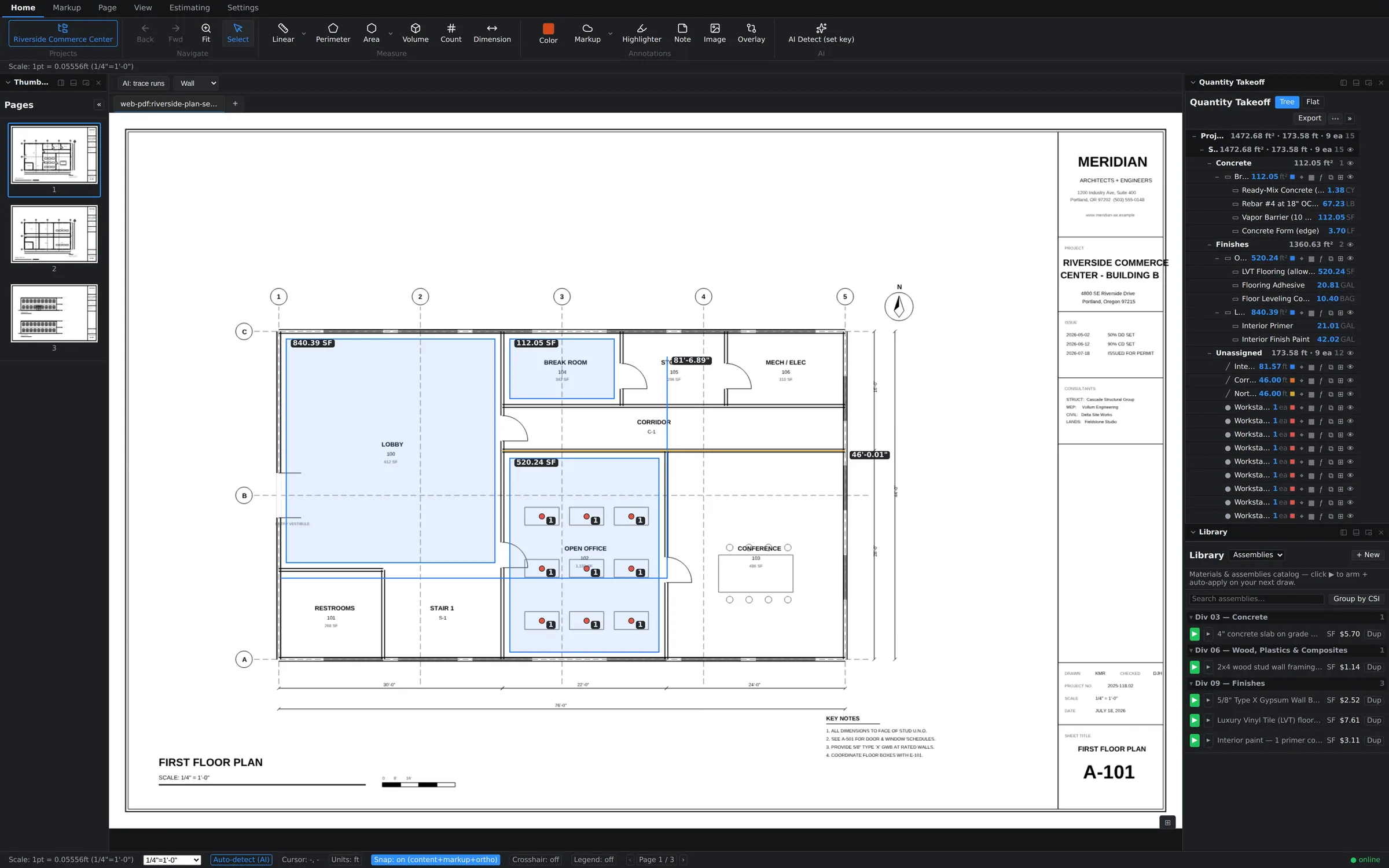
  • AI Detect — finds repeated symbols and suggests counts across the sheet
  • AI measure suggest — proposes measurements you confirm with a click
  • AI redact — flags sensitive content for one-click redaction before a set leaves the office
  • OCR — searchable text on scanned sheets, powering search and auto-align
Bluebeam charges $590/yr for its AI tier. STACK and On-Screen Takeoff sell AI as paid add-ons. Ours ships with every seat — including trials.
Count markers placed across repeated symbols on the sheet
Page tab — Overlay

Addendum 3 just dropped. Stay calm.

Plan Compare overlays revision B on the live canvas — not a flattened throwaway PDF. Removed ink turns red, added ink turns blue, unchanged ink goes dark. Re-measure the deltas immediately, on the same screen.
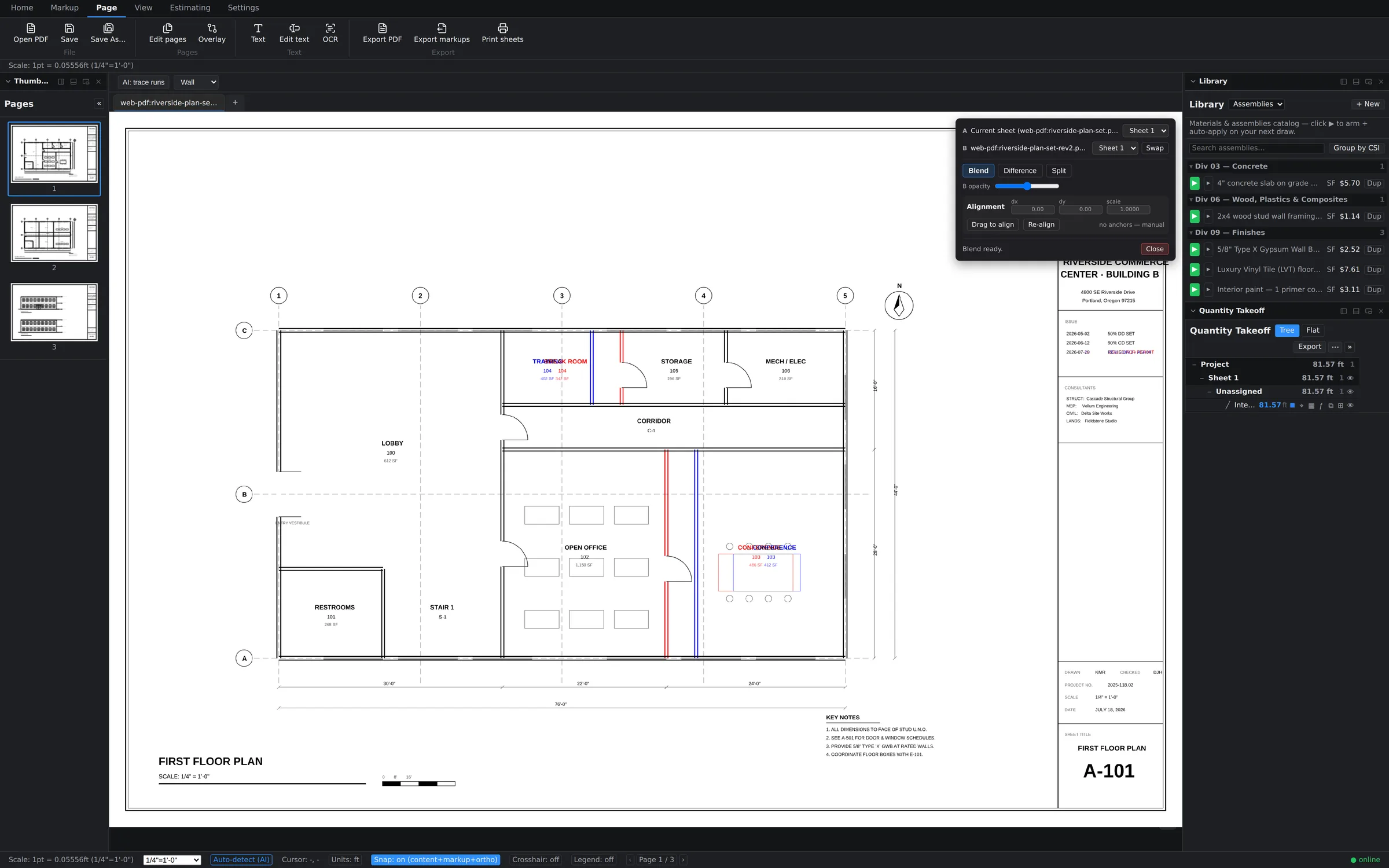
  • Diff mode — dual-tint difference: red = removed, blue = added
  • Blend mode — weighted overlay with an opacity slider
  • Auto-align — text-anchor alignment; manual dx/dy/scale and drag-to-align for scanned sheets
Plan compare overlay with diff tinting
Markup tab

Speak fluent GC.

Revision deltas, clouds, stamps, signatures — the whole review vocabulary, plus a Tool Chest that turns any markup you make into a reusable tool for the whole team.
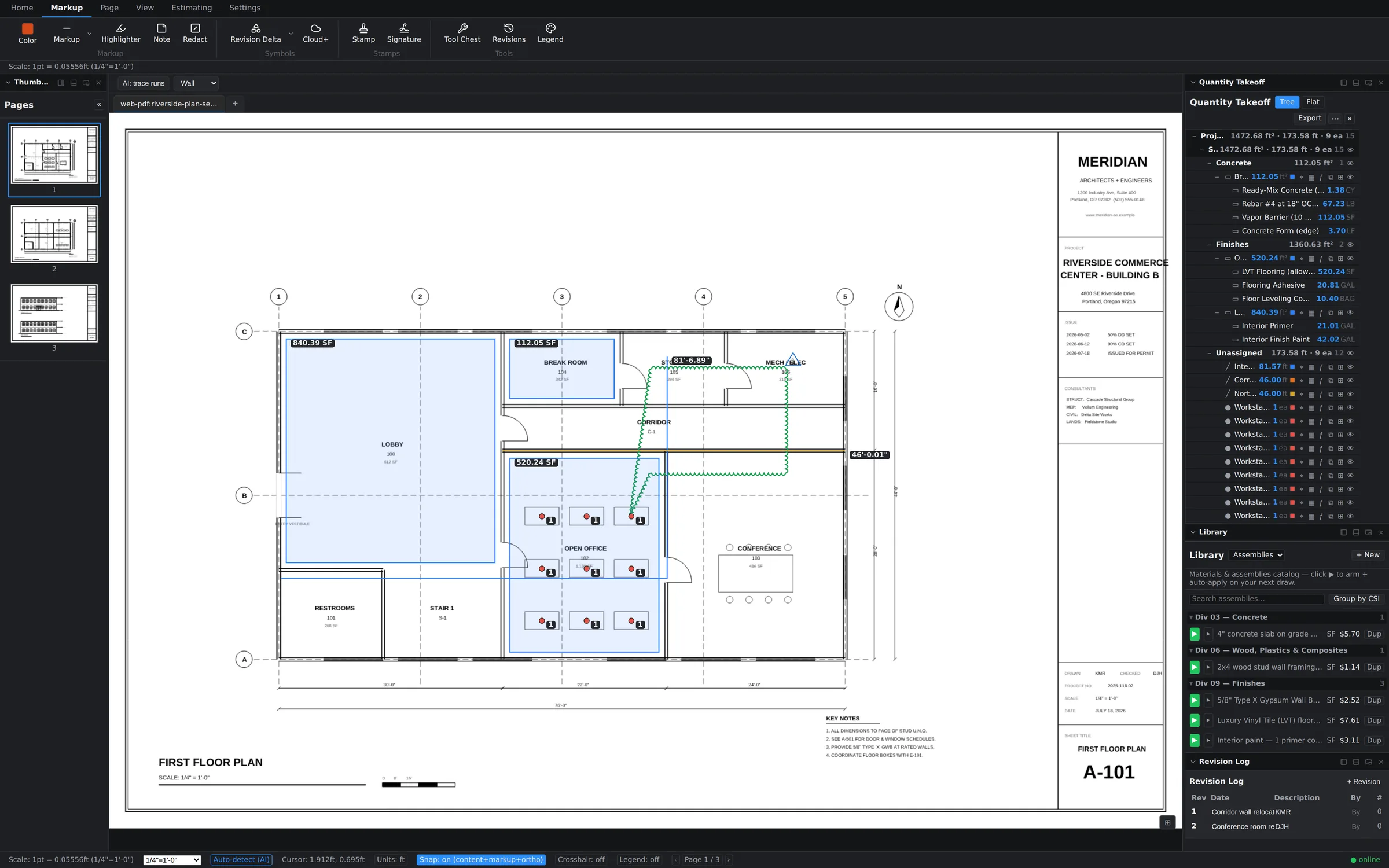
  • Markup, highlighter, notes, images, redaction
  • Revision Delta & Cloud+ symbols, stamps & signatures
  • Tool Chest, revision log, color legend — markup with an audit trail
  • Markup rotation, z-order control, per-markup properties
Revision cloud and delta with the Revision Log panel
View tab

Thirteen panels. Your layout.

Every panel docks left, right, or bottom — or floats free on a second monitor. The app remembers your arrangement.

PanelWhat it does
TakeoffQuantity tree and flat views, grouped by assembly or sheet, with export
EstimateLive estimate grid — quantities × costs, always current
LibraryMaterials & assemblies catalog; arm to auto-apply on next draw
AssembliesAssembly library and builder
Tool ChestReusable markup tools shared across the team
MarkupsEvery markup on the sheet, filterable, jump-to-click
LayersLayer visibility control
ThumbnailsPage navigation across the whole set
BookmarksSaved sheet locations — jump straight to the detail you need
Revision LogWho changed what, when
Color LegendColor → meaning map, printable for reviewers
AttachmentsSpecs, cut sheets, photos — attached to the project
NotesSheet-level notes for the next person in
Page tab — Documents

Serious PDF plumbing.

Page operations

Insert, delete, rotate, reorder. Edit text directly on the sheet. Print selected sheets.

Compression & PDF/A

Shrink 400 MB scan sets to something emailable; export archival PDF/A for closeout.

Office conversion

Word, Excel, and PowerPoint files convert to PDF inside the app — specs and takeoffs in one set.

Export everything

Export PDF with markups burned in or separated, export markup summaries, batch export data across sheets.

Offline-first architecture

Local-first storage with cloud sync. The amber indicator tells you you're offline; your work doesn't care.

Built for your trade

Trade-specific takeoffs,
one workflow.

Same six measurement modes, armed with your trade's assemblies. Pick yours.
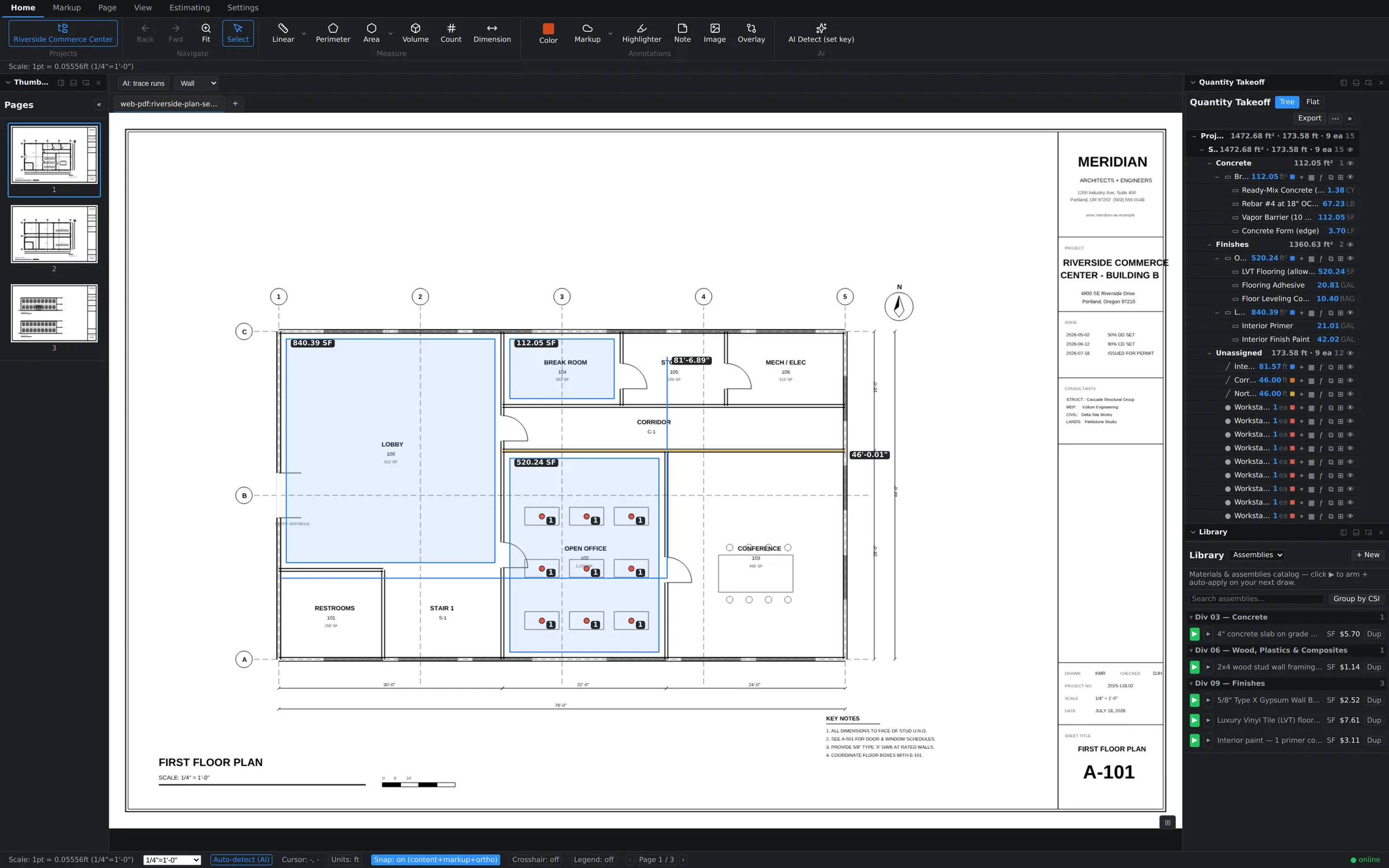
Every scope. One set of numbers.

  • Run all six modes across the full set — areas, runs, counts, volumes — grouped by CSI division in the Takeoff panel
  • Plan-compare overlay catches addendum scope creep before it eats margin
  • Batch export the whole bid package to Excel in one click
Combined takeoff on a plan sheet

Drywall: walls to sheets to dollars.

  • Linear wall runs feed stud, track, and sheet assemblies with waste factors built in
  • Type-X, ceilings, and finish levels modeled as separate assemblies in your library
  • Live estimate grid prices material + labor as you trace
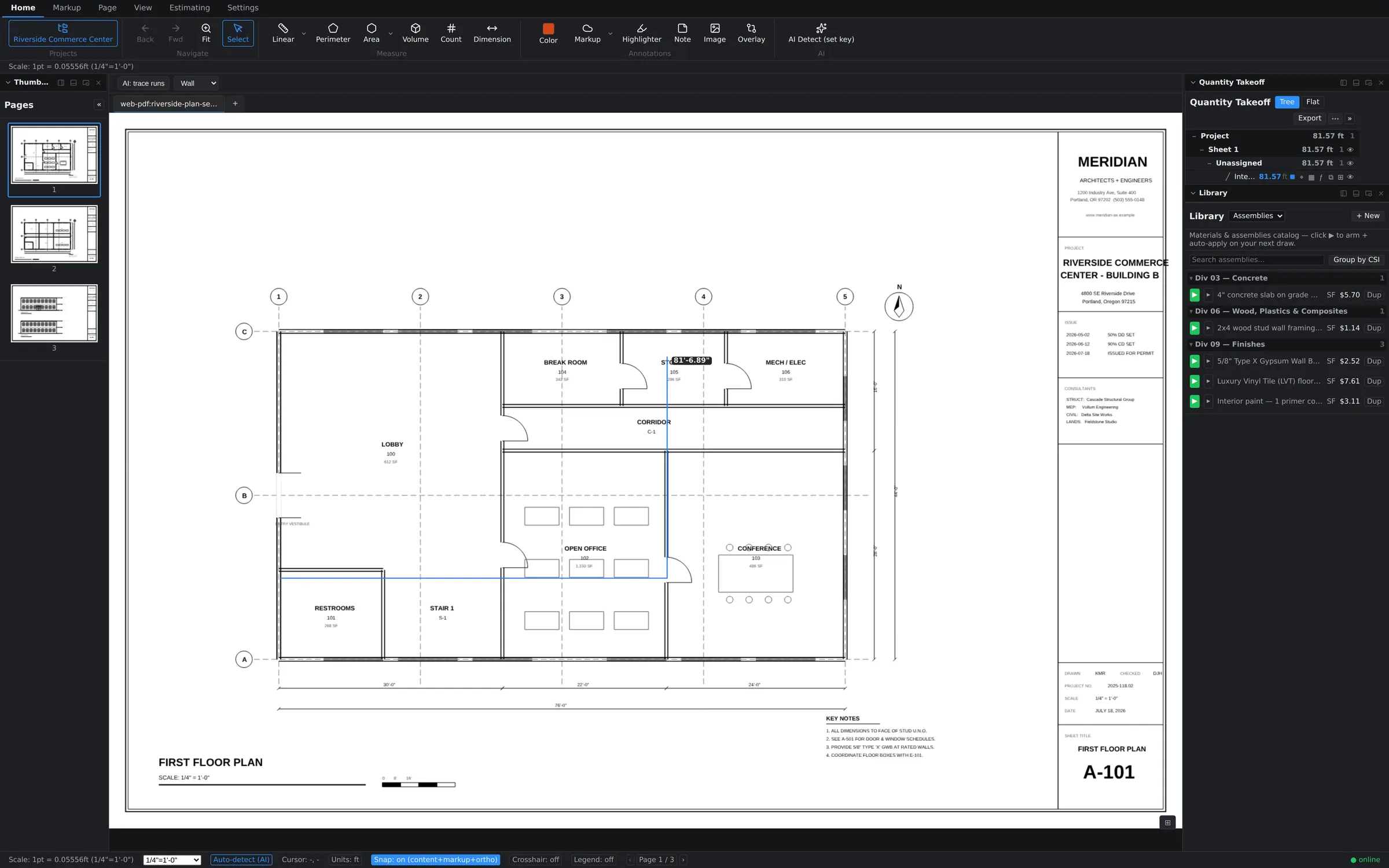
Linear wall takeoff

Concrete: volume is a first-class citizen.

  • Volume mode takes slab and footing quantities straight off the plan — depth-aware
  • Formula evaluator handles pours: (24*3)+8 in any quantity field
  • Slab-on-grade assemblies carry mix, reinforcement, and finishing labor
Area takeoff over rooms

Electrical: count everything that repeats.

  • AI Detect proposes device counts across the sheet — you approve each group
  • Linear mode for home runs and conduit paths, snapped to the drawing
  • Count markers stay linked to line items — recount updates the estimate
Count takeoff markers

Painting: surfaces at wall speed.

  • Area mode with per-room polygons; perimeter × height for wall surface
  • Primer + finish coats modeled as assembly line items with coverage rates
  • Color-coded takeoffs keep interior/exterior scopes readable on one sheet
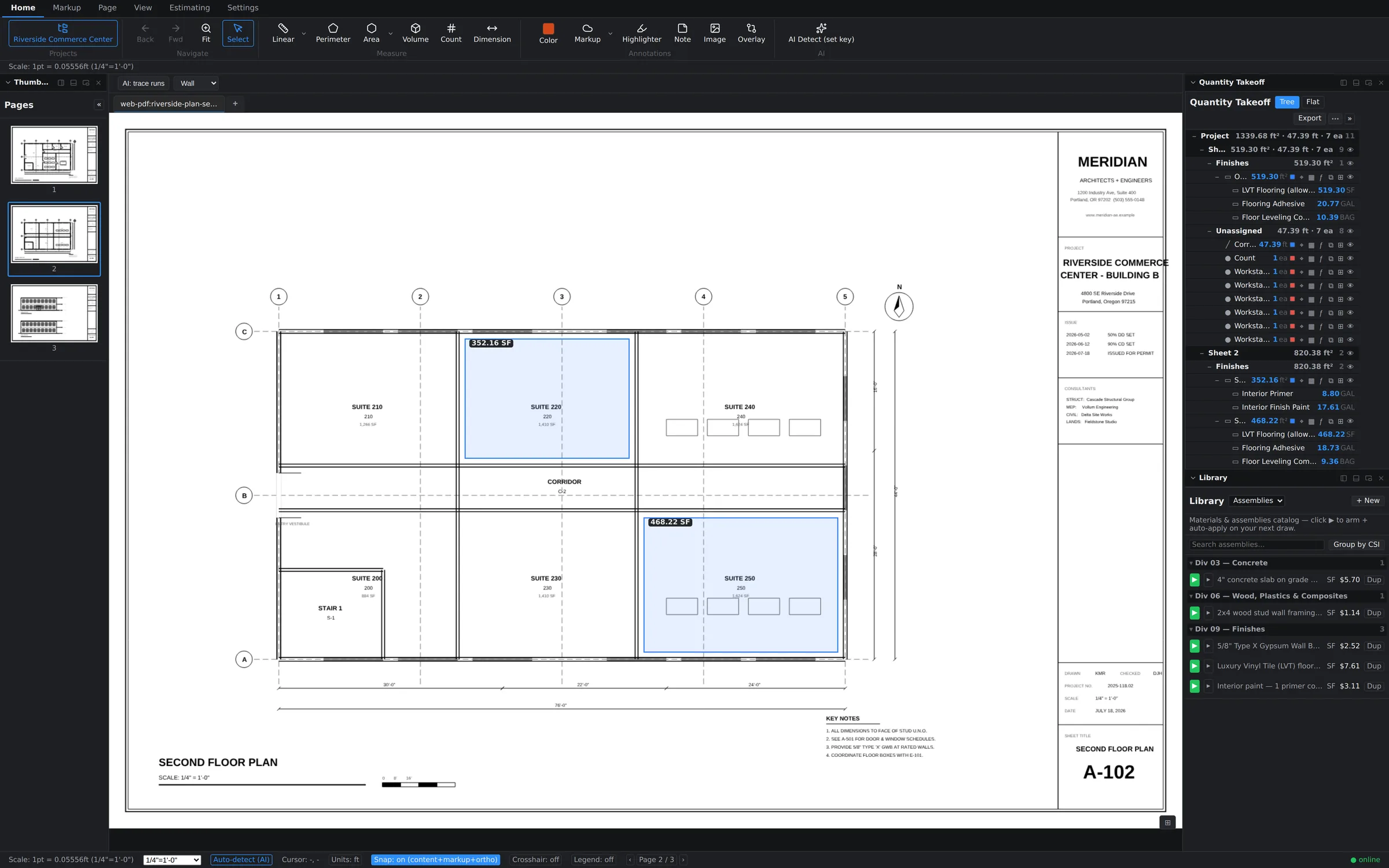
Second-floor suites measured with paint and flooring assemblies

Flooring: rooms to rolls in minutes.

  • Room-by-room area takeoffs with hole subtraction for stairs and openings
  • LVT, carpet, and prep assemblies with waste percentages per product
  • Perimeter mode doubles for base and transitions
Takeoff panel with quantities

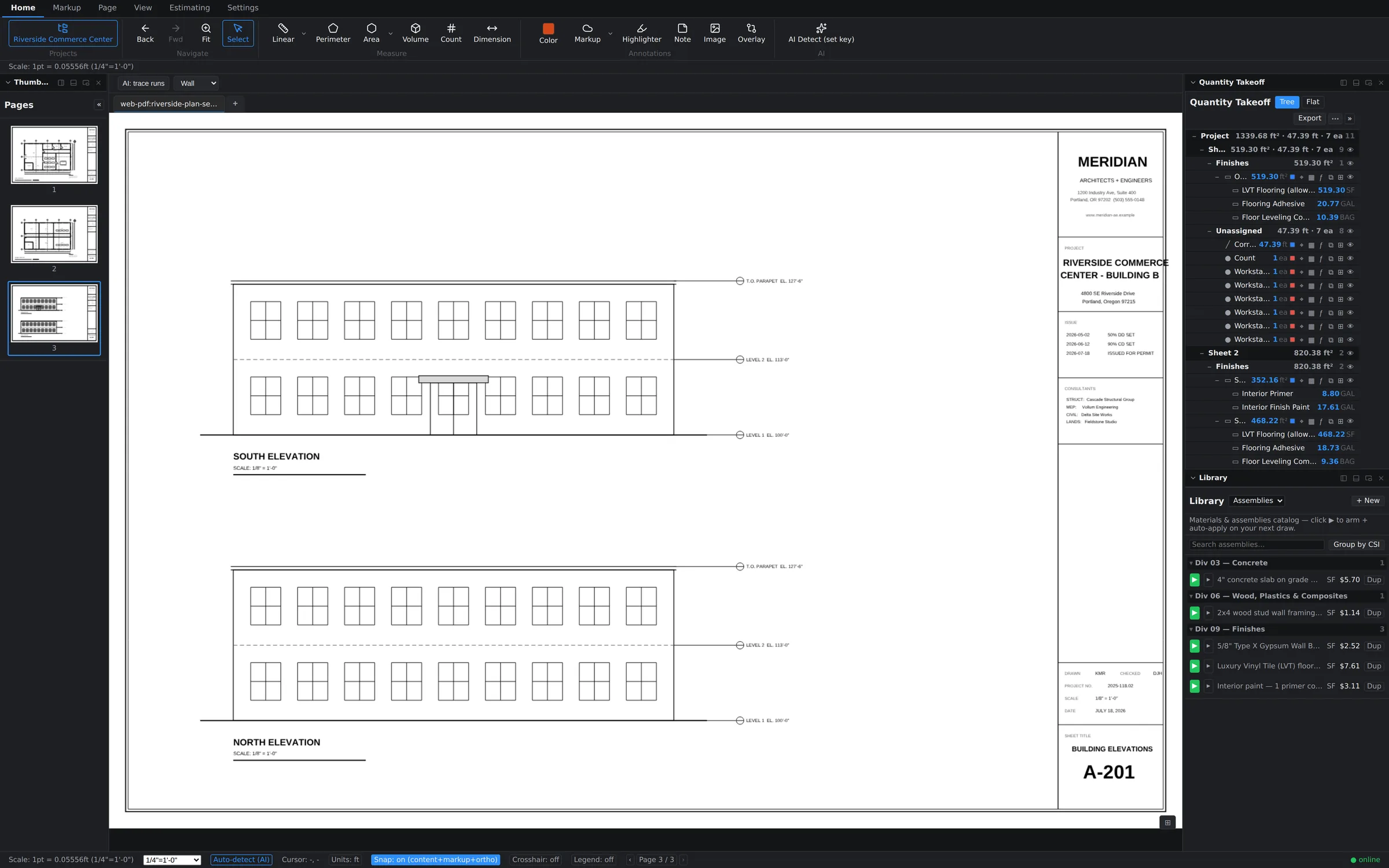
EIFS & exteriors: elevation math, handled.

  • Area takeoffs on elevation sheets with opening deductions
  • System assemblies: base coat, mesh, finish — priced per SF as you draw
  • Plan-compare overlay flags elevation revisions between bid sets
Building elevation sheet A-201 open in the app
Why it's faster

Five ways Groundwork
simplifies takeoffs.

1

Precision

Snap-to-drawing vertices, smart scale detection, and a formula evaluator mean the number on the sheet is the number in the bid.

2

Speed

Single-letter tool shortcuts, armed assemblies that auto-apply, and AI Detect for everything repetitive. Draw once; the estimate builds itself.

3

Traceability

Every quantity links to its measurement on the sheet. Click a line item, see exactly where it came from. Revision Log records who changed what.

4

Revision-proof

Plan-compare overlay paints removals red and additions blue on the live canvas; revision clouds and deltas document them. Addendum 3 becomes a ten-minute task, not a re-takeoff.

5

One window

No exporting quantities to a second program to price them. Takeoff, assemblies, estimate grid, and Excel export live in the same workspace — office and field, live.

Questions

Takeoff software, explained.

What is construction takeoff software?
Takeoff software measures quantities — lengths, areas, volumes, counts — directly from digital plan sheets (PDFs) so estimators can price a job without paper plans, scale rulers, or highlighters. Good takeoff software links those quantities to costs; Groundwork Takeoff does both in one window.
How is Groundwork different from a PDF markup tool?
Markup tools annotate documents. Takeoff tools produce bid-ready quantities. Groundwork does the full path: measurement modes with real scale math, assemblies that convert quantities into material and labor costs, a live estimate grid, and Excel/CSV export — plus the markup depth (clouds, stamps, legends) reviewers expect.
Does it work on a Mac?
Yes — natively, not through a browser or a Windows emulator. Groundwork Takeoff ships native apps for macOS (Apple silicon and Intel) and Windows, plus an iPad home-screen app and browser access. Same files, same live session on all of them.
Can my clients view my takeoffs without buying the software?
Yes. Export the marked-up PDF (markups burned in or separated) or the estimate to Excel/CSV — standard files anyone can open. No viewer license required.
Does the AI take off the whole sheet automatically?
It assists — deliberately. AI Detect finds repeating symbols and proposes counts, and AI measure suggestions propose measurements; you review and accept each one. Fully automatic takeoff sounds great until a missed wall costs you a bid, which is why every AI suggestion in Groundwork is reviewable before it enters your quantities.
What file types does it support?
PDF plan sets are the core format (vector or scanned — OCR makes scanned sheets searchable). Word, Excel, and PowerPoint files convert to PDF inside the app, and estimates export to Excel, CSV, and PDF.

See it on your own plans.

Upload a real plan set and measure something in the first five minutes.